How fast does a client gallery load? We measured it
Slow galleries cost attention — especially on a phone. We measured Lumio's load time under realistic 4G, disclosed the method, and published the script so you can verify it yourself.
Every gallery software claims to be “fast”. Almost nobody makes it verifiable. For Lumio we wanted real numbers instead of gut feeling — so we measured, disclosed the method, and published the script you can use to reproduce it yourself.
Why load time matters
Most clients open their gallery on a phone first, often on the move over mobile data. If the first image takes too long, or the layout jumps around while loading, patience drops — and in the worst case someone never looks at the photos properly at all. Performance here isn’t an end in itself; it’s part of the handover.
How we measured
We measured with a real browser (headless Chromium, driven via Playwright), not a plain HTML fetch — in modern galleries the content only loads via JavaScript. The profile matches the mobile Lighthouse standard:
- Device: Pixel 5
- Network: “Slow 4G” — 1.6 Mbit/s download, 150 ms latency
- CPU: 4× slowdown (emulating a mid-range smartphone)
- several cold runs, the median is evaluated
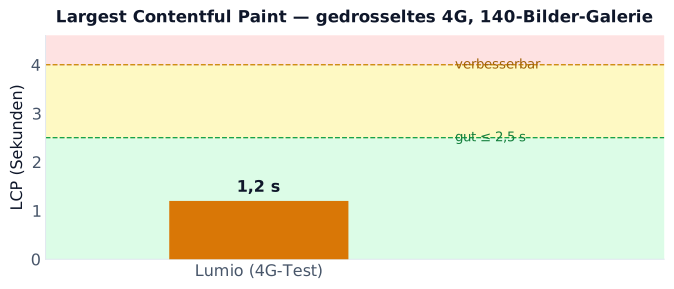
We capture the Core Web Vitals — above all LCP (when the largest visible content is there; good is ≤ 2.5 s) and CLS (how much the layout shifts while loading; good is ≤ 0.1) — plus the number of network requests.
The complete script is open in the source-code repository: bench/frontend-perf.mjs. You can run it with your own gallery URL and reproduce the numbers.
The result
Measured on a gallery with 140 images, under the 4G profile above:
- LCP ~1.2 s — the largest visible content is there within the “good” Web Vitals threshold
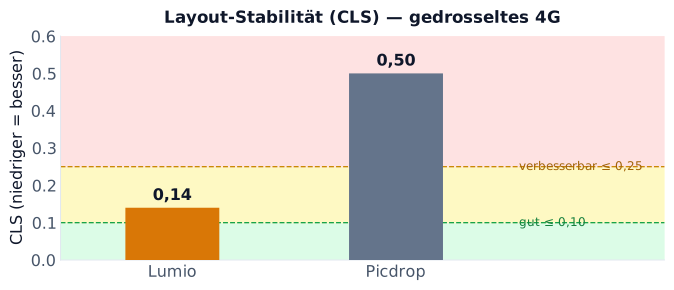
- CLS ~0.14 — few layout shifts
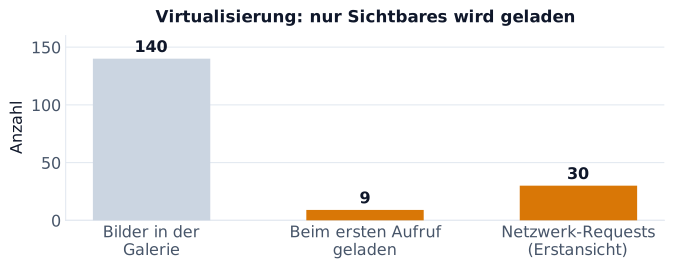
- ~30 requests on first view — even though the gallery contains 140 images
The last point is the decisive one: the grid is virtualized and only loads what’s currently visible. A gallery with ten times as many images still loads similarly little at first — you don’t pay for the full set of images on the first view.
The comparison — with perspective
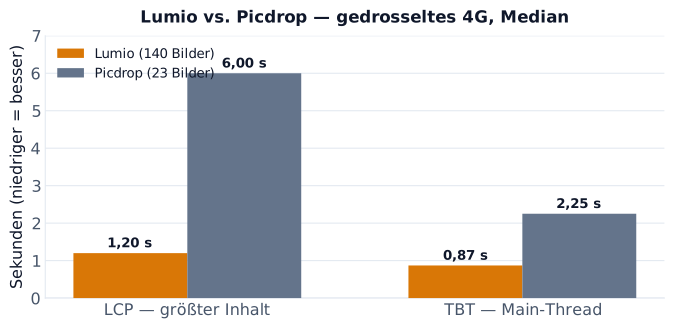
For context, we also measured a gallery from an established provider (Picdrop) under identical conditions. In our test it came — with considerably fewer images (23) — to an LCP of around 6 s, noticeably more layout shifts and a multiple of the network requests.
On layout stability (CLS) the gap is clear too. And here we stay honest: Lumio’s value (0.14) is itself still just within the “needs improvement” range — but well ahead of Picdrop’s 0.50.
Honesty is part of this: it’s one data point, not an industry benchmark. Both sites were measured from the same location, the galleries are different sizes, and providers with a global CDN may perform differently depending on region and cache state than a single run shows. But the relative gap was consistent across our runs — and that’s exactly why we publish the script: so you don’t have to take our word for it, you can measure it yourself.
Why Lumio is ahead here
It’s not tricks, it’s architecture:
- Virtualized grid — only visible images land in the DOM and get loaded.
- Direct-to-S3 uploads and signed URLs — delivery bypasses the app server.
- Adaptive video (HLS) with a scrubbing preview instead of huge raw downloads.
- Lean page — little DOM, little blocking JavaScript on first build.
Conclusion
Lumio loads client galleries fast — measurably, even on a throttled mobile network and especially for large galleries. We don’t attach marketing superlatives, just a number (LCP ~1.2 s in the 4G test) and the script to verify it. If you want to test it yourself: plug in your gallery URL, run the script, read the median.