Uploading large files: RAW, video and the upload limit under control
RAW files beyond 50 MB, video clips of several gigabytes: anyone working professionally quickly hits upload limits. What matters with large files and a sensible limit.
Professional image files are large, and they’re getting larger. A RAW file from modern cameras quickly sits at 50 to 80 MB, a short high-resolution video clip at several gigabytes. Anyone who wants to hand such files to clients or archive them needs a platform that can take it — and that lets them set the limits themselves.

When the upload limit becomes a bottleneck
Many tools set tight per-file caps. For JPEGs that’s fine, for RAW and video it isn’t. Hit too low a limit and all that’s left is falling back on stopgaps like WeTransfer or a USB stick — with all the known downsides for data protection, traceability and professionalism. A gallery solution that accepts RAW formats (CR2, NEF, ARW and co.), HEIC as well as MP4 and MOV at true pro size spares you this break.
Why an adjustable limit makes sense
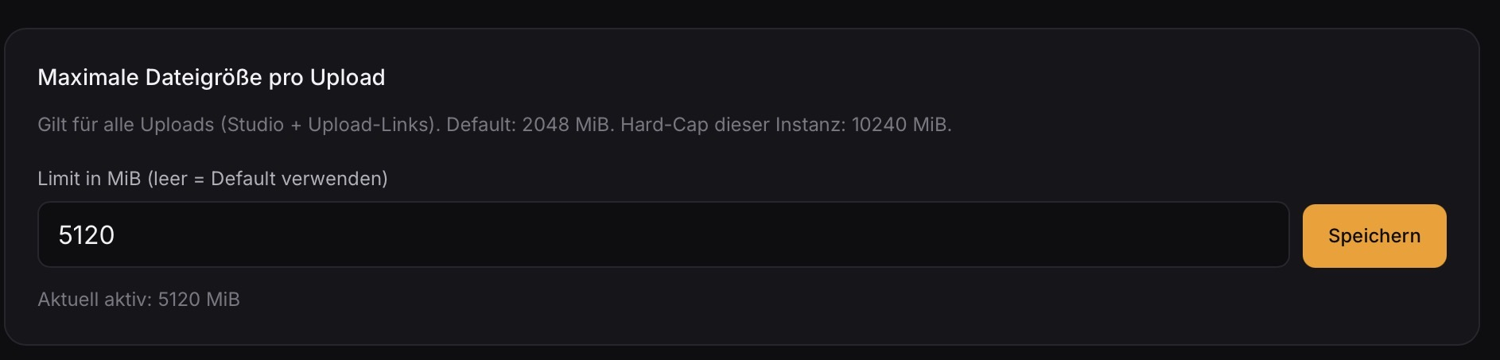
A configurable upload limit sounds technical but is practical. It lets you set a cap that suits your way of working — high enough for your largest files, but not unlimited, so a 30 GB rough cut doesn’t accidentally land in the client gallery. A reasonable default (around 2 GB per file) covers most cases; if you need more, you raise the limit specifically, up to the ceiling your instance allows.
Don’t forget speed
Large files need stable uploads. Robust upload mechanisms that don’t start over on a shaky connection help, as does a hint mode for slow connections. That way uploading 43 RAW files doesn’t become a test of patience.
Conclusion
Anyone working with RAW and video needs a platform without tight file limits — and the freedom to set the limit themselves. The right range of formats, a sensible default with room upward and stable uploads make the difference between smooth working and constant stopgaps.
Lumio is built exactly for that: you upload JPEG, PNG, WebP, HEIC, RAW (CR2/NEF/ARW…), MP4 and MOV at pro size and set the maximum upload limit per file yourself — with a sensible default and a clear ceiling.